Artificial Intelligence is reshaping every industry and educational institutions are stepping up to ensure students are ready for the AI-driven future. But setting up an AI lab that balances cost, performance, and scalability isn’t easy.
Here’s how a leading education institute partnered with Syncious to build a cost-optimized AI Lab using the SyncHPC platform empowering researchers with real-world AI and machine learning capabilities.
The Vision: Cost-Effective and Student-Friendly AI Infrastructure
The institute aimed to build a modern AI lab with the following requirements:
- Support for 100 concurrent users
- Access to AI modules and workflows aligned with the curriculum
- Flexible usage of CPU, RAM, and GPU resources as per the policy
- Built-in scalability for future upgrades to high-end GPUs
- cost optimization using NVIDIA L40s cards instead of H100/H200
- vGPUs-enabled VDI sessions on Linux machines
- Kubernetes-based architecture supporting both VDI machines with vGPU or submit ML training jobs on SyncHPC
Solution Architecture: Powered by SyncHPC
Hardware Setup:
- Management Nodes with HA: Couple of standard servers with required specifications
- Worker Node: Few servers with 4x NVIDIA L40s GPUs and NVIDIA vWS licenses
Software Stack:
- SyncHPC Platform License for 100 users
- NVIDIA vGPU License for vCS and/or vWS.
- Red Hat Enterprise Linux or Rocky Linux on each server
Solution with SyncHPC : How SyncHPC Delivered
Deploy
- Setup 1 Management Node with Rocky or RHEL and then run SyncHPC VDI installation scripts for KVM and SyncHPC-Infra VMs. For HA, 2 such nodes can be configured.
- There will be 2 SyncHPC components: 1. Infra – For Infrastructure and Virtualization Management. This is typically managed by Infra Admins (Network, Storage, etc.), 2. VDI – For VDI management. This will be managed by VDI admins. Both of these components will be running a VMs on Management node.
- SyncHPC-Infra provisions the VDI infrastructure with storage and network configuration. It will also add the Worker nodes as KVM hosts for VDI management.
- The Infra admin creates SyncHPC-VDI VM. Then, the VDI admin can use this component create/manage mutliple VMs and Users.
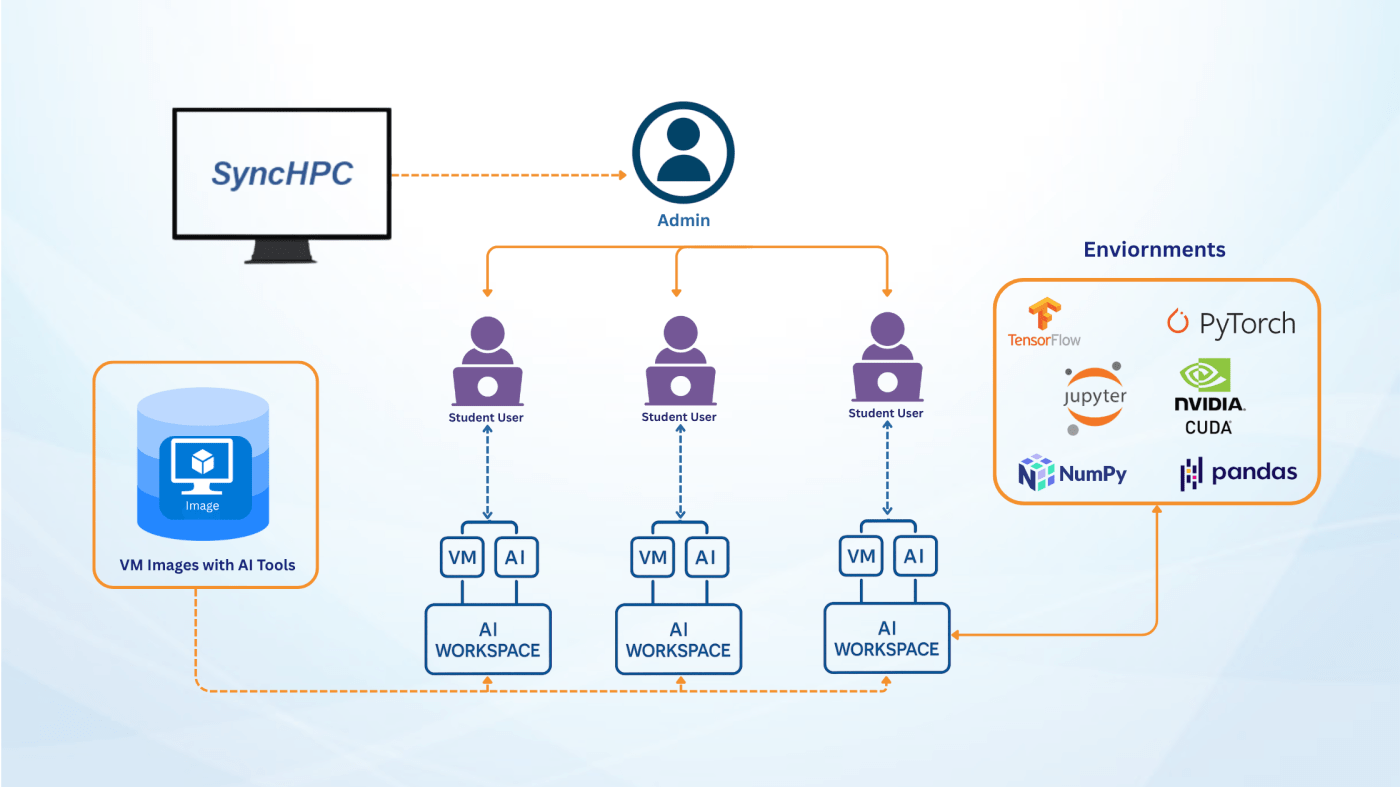
- Virtual Machines with vGPUs for 100 users are created and configured for users.
- All the VMs will use pre-configured AI image provided by SyncHPC.
Manage
- As discussed, the Infra admin uses SyncHPC-Infra for storage, network, etc configuration.
- The VDI admin uses SyncHPC-VDI for VMs/User management. It also controls the security components.
- IT team can monitor and configure usage restrictions on users based on resources
- This helps to optimize resources and allocate to multiple users
- It also helps to get analytics of past usage and forecast future requirements
Access
- SyncHPC provides a web-browsed VM Desktop interface for users. It will be used as AI Workspace by them.
- VDI admin can select the choice of protocol for VDI access like VNC, DCV, RDP or HP Anyware.
- Each user can get a VDI session with vGPUs from the NVIDIA cards

User Workflow – vGPU-Enabled VDI Sessions
- User connects to the Linux/Windows based Workspace with specific CPU/RAM and vGPUs
- User can access this workspace for AI experimentation, analysis and Visualization
- For example, users use the workspace to run AI experiments, local ML training withing the workspace, Visual Graphs, 3D images/Videos, etc.
Benefits
- Each user gets his/her own AI Workspace
- User can run medium size problems with less cost
- User can built their own environments inside the workspace easily
Challenges
- Less Scalable
- Maximum available recourses per user are limited
Key Features
- Optimum GPU Performance and Allocation: Delivering top-tier GPU performance
- Enterprise-Grade Security: Prioritize data security with enterprise-grade security measures to protect sensitive information and processes
- Shared User Storage: Easy migration across VMs
- Usage Analytics: Provides top management with valuable insights for future planning
- Centralized Management: Full remote admin control, enabling them to monitor, configure, and troubleshoot AI recourses
Conclusion
This real-world deployment showcases how SyncHPC are helping educational institutes leap into the AI era affordably, scalable, and effective.
Interested in building a similar AI Lab or that suits your requirements for your institution?
Reach out to Syncious today!
 blog.syncious.com
Leave a comment