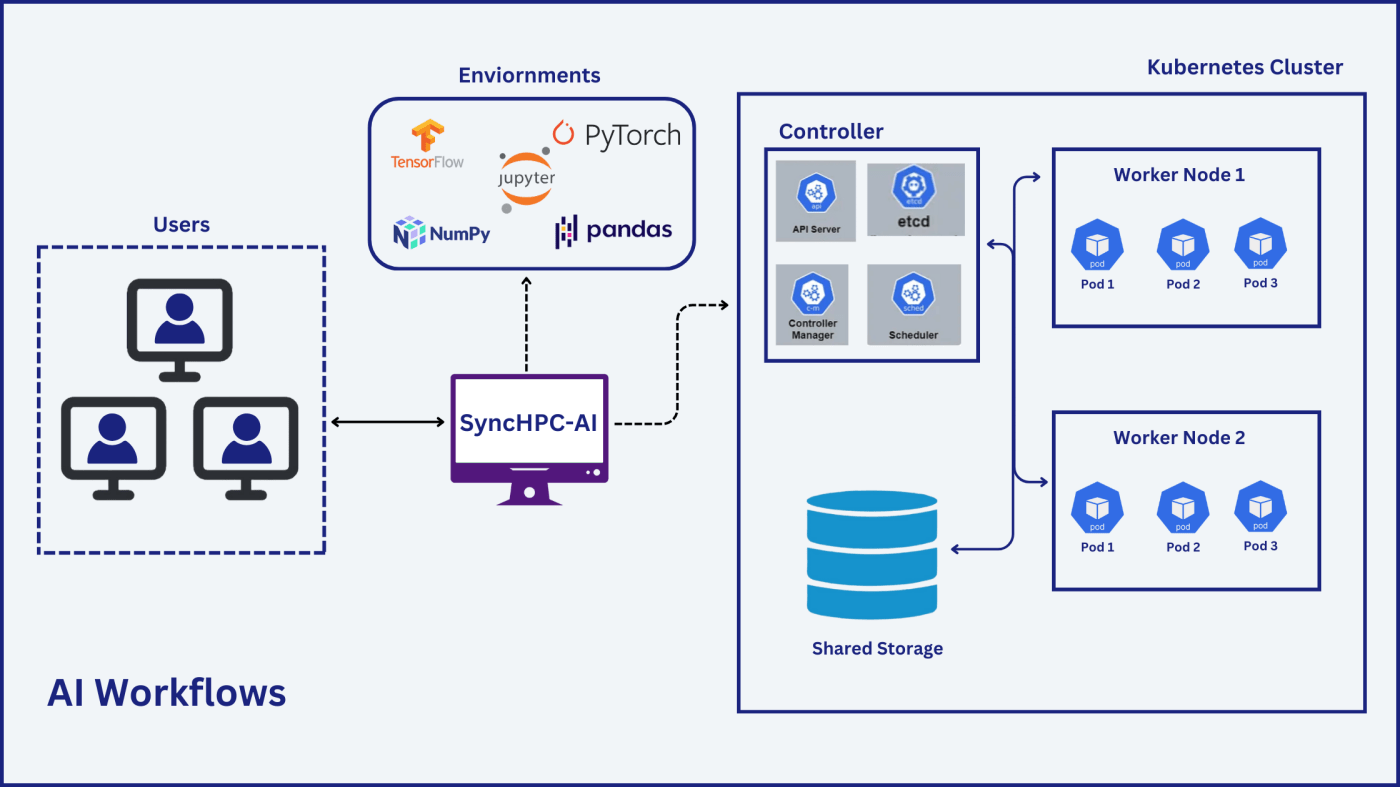
Setting up an AI lab for “scalability” needs a thorough process and right tools. This blog describes the implementation of “scalable” AI solution using SyncHPC. Here’s how a leading education institute partnered with Syncious to build a high-performing and scalable AI Lab Using the SyncHPC platform empowering research students with real-world AI and machine learning capabilities.
The Vision: Scalable and User-Friendly AI Infrastructure
The institute aimed to build a modern AI lab with the following requirements:
- Support for 100 concurrent users
- Access to AI modules and workflows aligned with the industry standard
- Flexible usage of CPU, RAM, and GPU resources as per the policy
- Built-in scalability for future upgrades to high-end GPUs
- Using NVIDIA H200 GPUs
- Kubernetes-based architecture supporting complete lifecycle of AI users.
Solution Architecture: Powered by SyncHPC
Hardware Setup:
- Controller Node: A server with standard 16 CPUs, 128 GB RAM
- Worker Nodes: Four servers with NVIDIA H200 GPUs and 32 CPUs, 256 GB RAM
- Storage: A NAS storage with CSI (Container Storage Interface) support.
Software Stack:
- SyncHPC Platform License for 4 GPUs and 100 concurrent users
- Red Hat Enterprise Linux or Rocky Linux on each server
Solution with SyncHPC : How SyncHPC Delivered
Deploy
- SyncHPC provisioned an AI cluster with 1 Controller Node + 4 Worker Nodes along with Kubernetes and shared NAS storage
- Built-in JupyterHub, local model repository, connection with Hugging Face and user storage gets created
Manage
- IT team can monitor and configure usage restrictions on users based on resources
- This helps to optimize resources and allocate to multiple users
- It also helps to get analytics of past usage and forecast future requirements
Access
- SyncHPC provides a web-browser-based interface for users
- Users can run ML training jobs
- Also, they can request Jupyter session from Jupyter Hub
- Users can also access the PODs with terminal
Scalable Workflow Experiences for Users
Scalabe Workflow – Kubernetes-Driven AI Jobs
- Access Jupyter Notebook/Terminal on PODs via SyncHPC
- Submit ML/AI jobs using Helm charts and Kubernetes commands
- Monitor workloads and resource utilization in real-time
Benefits
- More-flexibility with K8S cluster and user resource management
- High Performance GPUs like H100/H200 can be used
- Scalable and high resource allocation per user
Challenges
- Cost of infrastructure will be higher
- High performance GPUs like H100/H200 will be costly
Key Features
- Optimum GPU Performance and Allocation: Delivering top-tier GPU performance
- Enterprise-Grade Security: Prioritize data security with enterprise-grade security measures to protect sensitive information and processes
- Share Storage with PVCs: Persistent Volume Claim (PVC) features
- Usage Analytics: Provides top management with valuable insights for future planning
- Job Scheduler: Efficient AI/ML manage and schedule jobs on Kubernetes cluster for maximum resource utilization and productivity
- Containerized Workloads: Kubernetes & SLURM-enabled deployments across different environments
- Centralized Management: Full remote admin control, enabling them to monitor, configure, and troubleshoot AI recourses
Highlights of the AI Lab Solution
Ease of Use
- Intuitive interface for both students and IT admins
- Built-in automation deployment and management via SyncHPC
Scalable Infrastructure
- Easily expandable with more worker nodes or GPUs in future phases
Replicable Model
- A blueprint for other research and education institutions aiming to establish similar AI labs with constrained budgets
Conclusion
This real-world deployment showcases how SyncHPC are helping educational institutes leap into the AI era affordably, scalable, and effective. The Pune college’s AI Lab now empowers students with real-time AI training, flexible access, and hands-on experience preparing them for the next wave of innovation.
Interested in building a similar AI Lab or that suits your requirements for your institution?
Reach out to Syncious today!
 blog.syncious.com
Leave a comment