Training an AI model is only one stage of the workflow. Engineering teams may develop in-house models trained on simulation data, experimental results, or operational datasets, or use third-party models sourced from open-source repositories or external providers for applications such as CFD, aerodynamics, and computer vision.
To make these models usable in engineering workflows, two stages are essential:
- Model Deployment: Configuring the trained model and its runtime dependencies, then deploying it on GPU infrastructure with an accessible inference endpoint.
- Model Inference: Passing new input data to the deployed model to generate predictions, such as velocity fields, pressure distributions, or other engineering quantities.
SyncHPC brings both stages into a unified workflow. Teams can deploy in-house or third-party models on their GPU clusters, package them with the required dependencies, and make them accessible through API-key-protected inference endpoints. SyncHPC also provides a simple interface for submitting inputs and browser-based 3D visualization of the resulting predictions.
The example below demonstrates this workflow using a pre-trained model for simulation-based prediction: deploying the model, submitting engineering geometry for inference, and visualizing the predicted fields in 3D within SyncHPC. The same workflow can be adapted to other compatible AI models and engineering applications.
Two types of Models : Built In-House and Third-Party
SyncHPC supports compatible models developed in-house or provided by third parties. If it is already trained, then SyncHPC can deploy it either on-premise or on cloud. Most teams start from one of two places:
Model Source: In-house models trained on simulation or test data, or third-party pre-trained models such as DoMINO for CFD aerodynamics.
Deployment Inputs: Model files or weights, configuration, container image, and inference script.
SyncHPC: Deploys models on the GPU cluster, secures inference endpoints with an API key, and provides an interface for running predictions.
What SyncHPC handles
Once the model is in place, SyncHPC covers everything between “trained” and “used”:
- Deploy. A four-step wizard turns your model, image and scoring script into a running deployment, sized with the replicas, CPU, memory and GPU you choose.
- Access. Each deployment gets a scoring endpoint protected by a secret key, so your own scripts and applications can call the model directly.
- Execute. An inference profile turns the model’s inputs into a form, so engineers can start runs without writing API calls.
- Manage Results. Every run is tracked, and its outputs are saved in SyncStore, SyncHPC’s shared file storage, in an output folder beside the model’s files.
- Visualize. Open results in ParaView, in the browser, and explore them in 3D.
Example CAE Inferencing Workflow: From Model Deployment to 3D Visualization
The example is a pre-trained aerodynamics model: DoMINO, trained on the open DrivAerML dataset of 500 car-shape variants. It takes a car’s geometry as an STL file and predicts pressure and wall shear stress on the surface, plus velocity and pressure in the air around the car. Everything below happens inside one SyncHPC AI Studio project, and the same steps apply to your own model.
Admin / Data Scientist Interface
1. Open SyncHPC-AI Studio Project
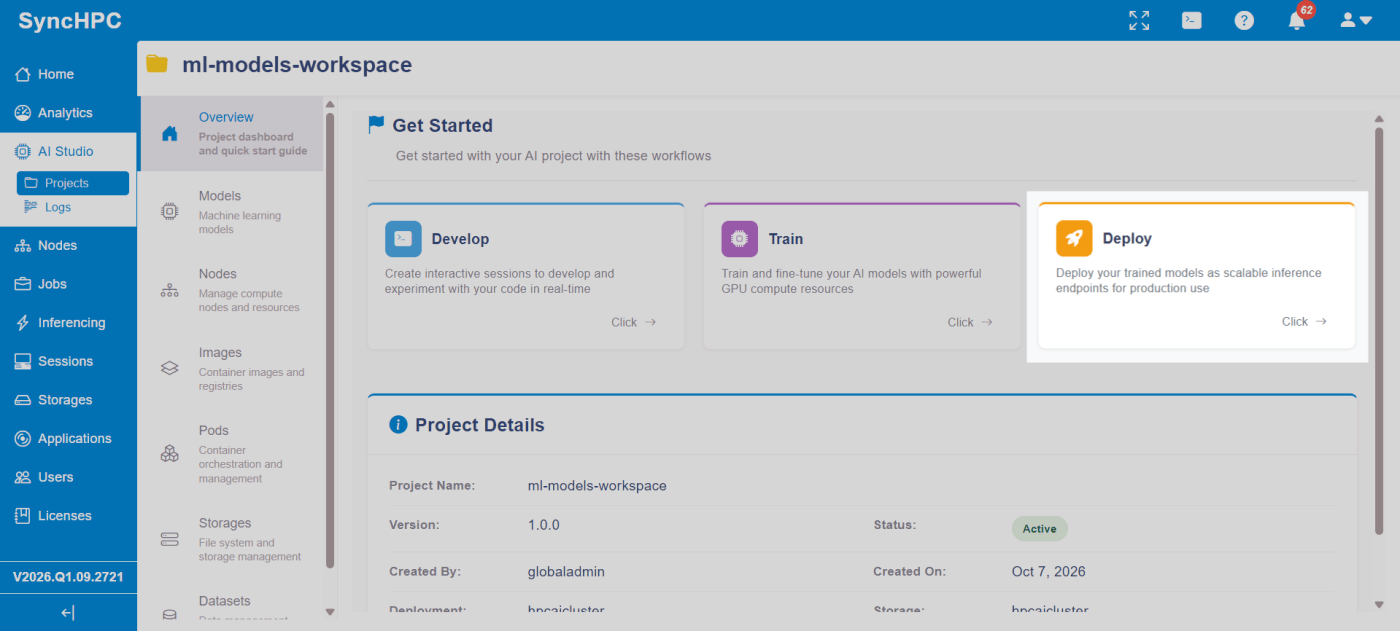
Each model is managed within a SyncHPC AI Studio project, bringing together resources such as compute nodes, container images, storage, and datasets. The platform provides three workflows: Develop, Train, and Deploy. Since our model is already trained, we proceed directly to Deploy to configure its inference endpoint.
2. Configure the Model
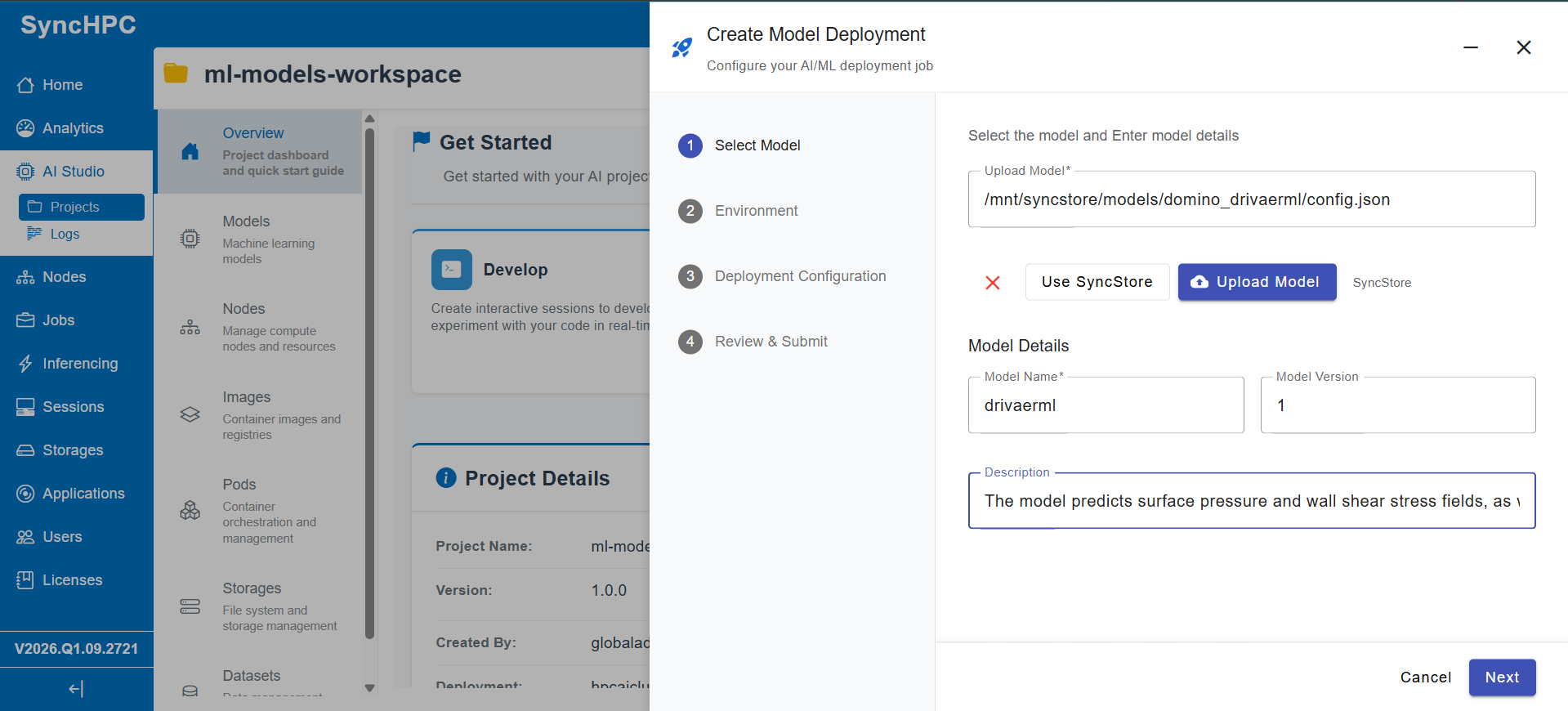
Select or upload the model configuration file from SyncStore, then specify the model name, version, and description to identify and document its purpose within the project.
3. Configure the Execution Environment
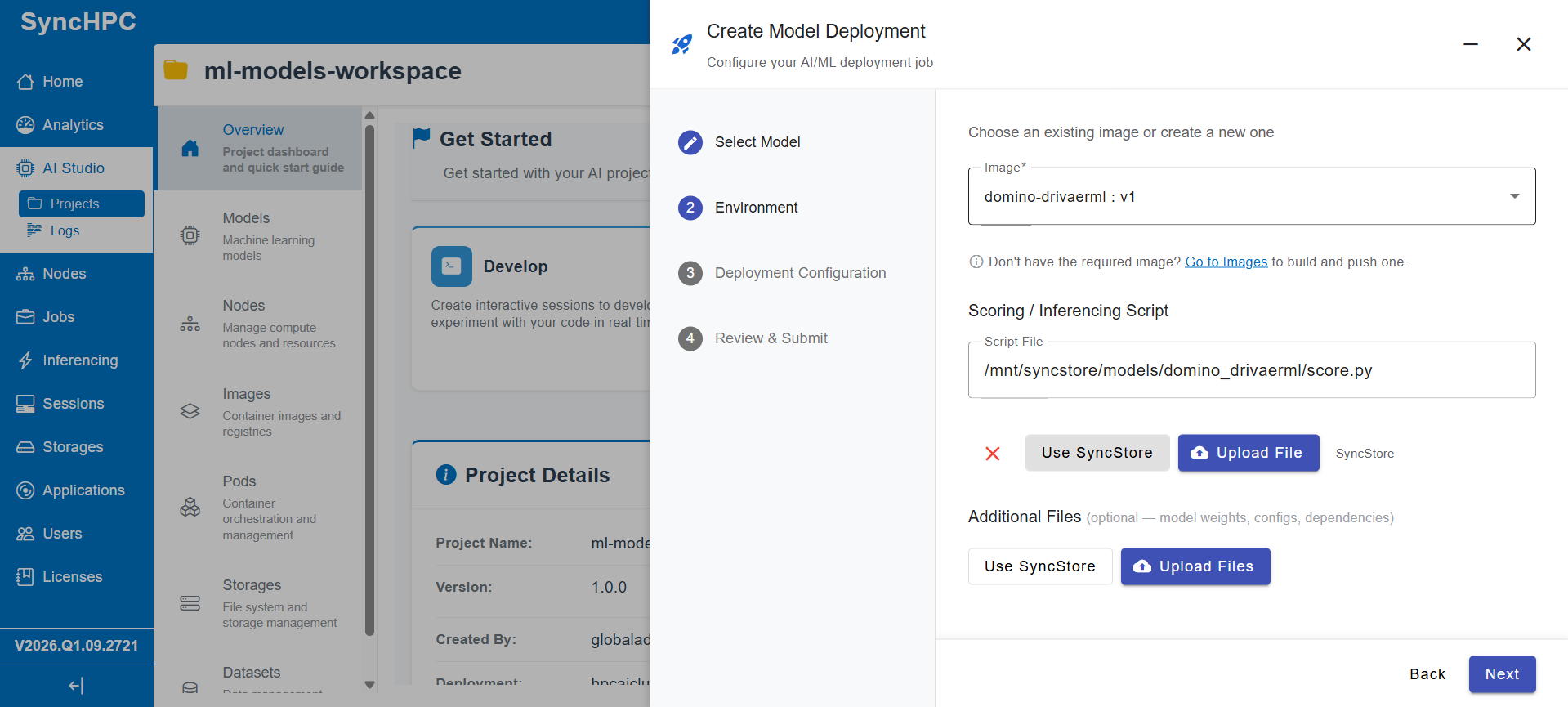
Select a runtime container image from the private registry, or build and push one if needed. Then specify the scoring script for handling inference requests and provide any additional required files, such as model weights, configurations, and dependencies.
4. Configure Deployment Resources
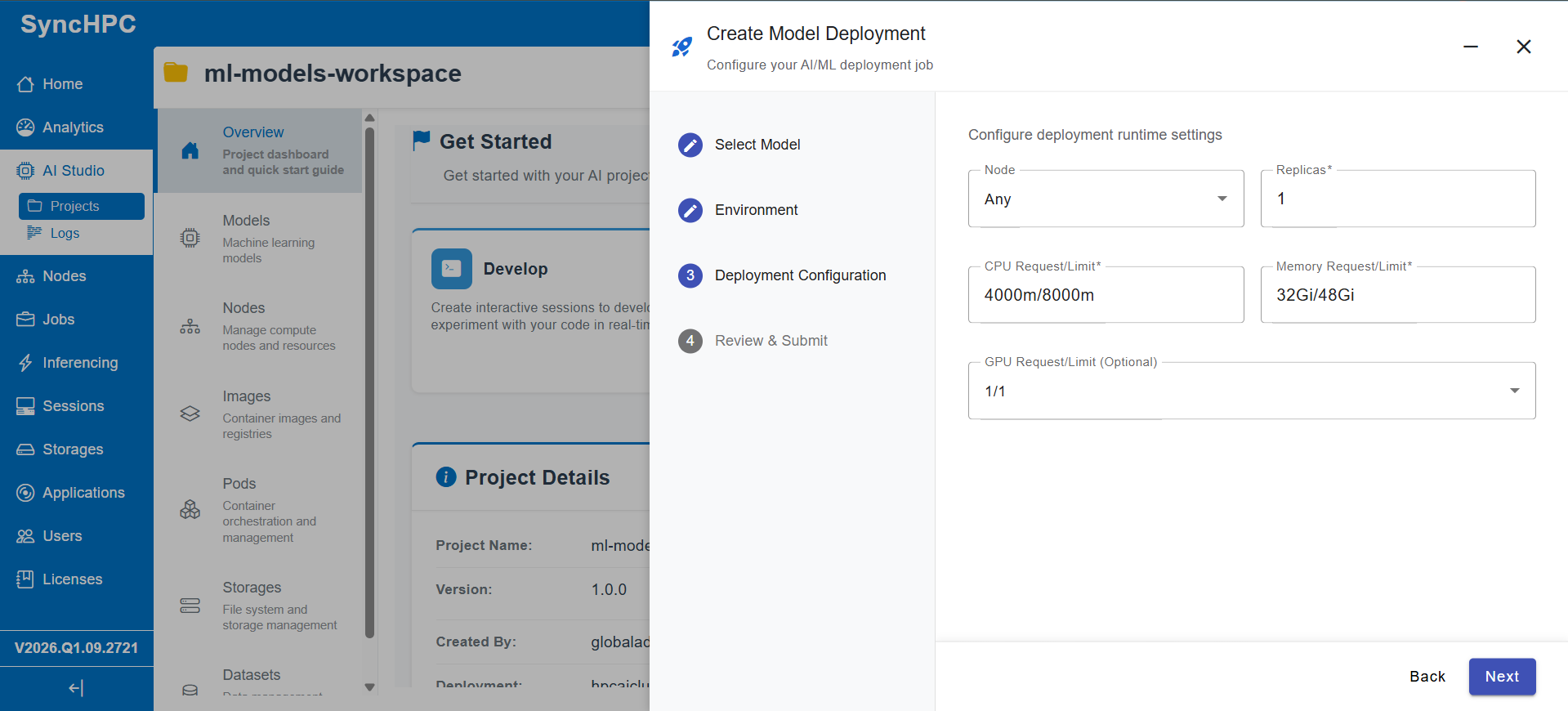
Configure the node placement, replica count, and CPU, memory, and GPU requirements based on the model’s workload. For DoMINO, the deployment uses one replica, 4–8 CPU cores, 32–48 GiB of memory, and one GPU. Once verified, select Deploy to submit the deployment.
SyncHPC also provides a Deployment Logs viewer, consolidating Kubernetes events and container output to help troubleshoot issues such as GPU scheduling constraints and storage-mount failures.
5. Access the Inference Endpoint
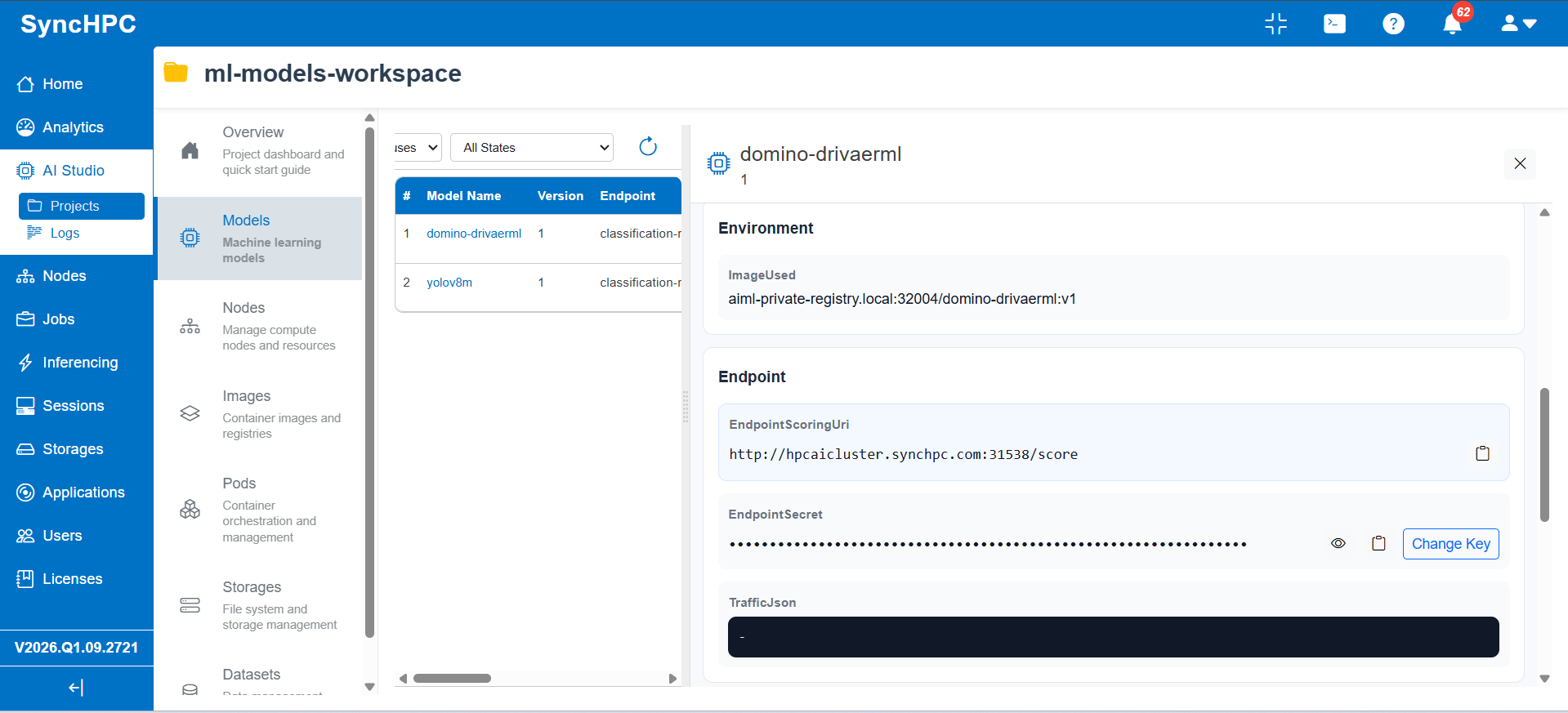
Once deployed, access the model details to view its container image, scoring URI, and secret key. The scoring endpoint enables authorized scripts and applications to submit inference requests, while the secret key supports controlled access to the model.
6. Configure an inference profile
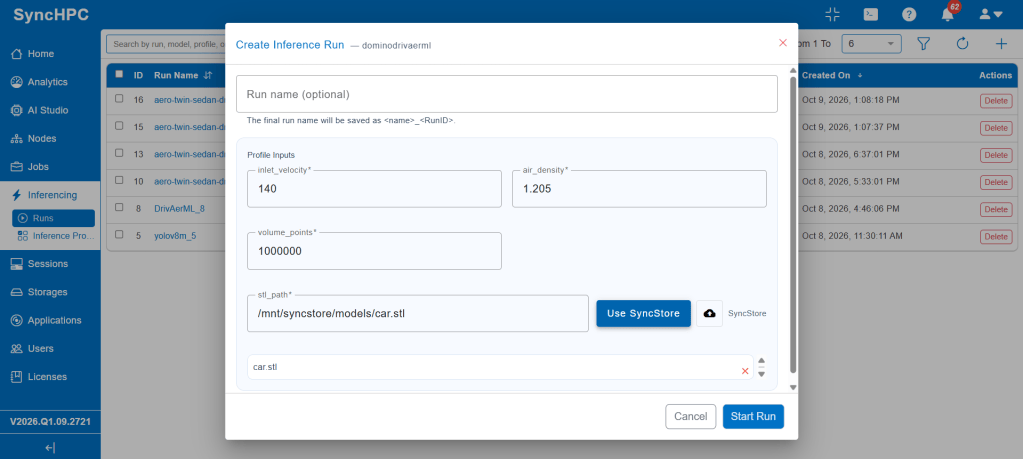
An inference profile defines the model’s required inputs and generates a reusable form-based interface for launching inference runs. For DoMINO, inputs include inlet velocity, air density, volume point count, and vehicle STL geometry, enabling engineers to run predictions without manually constructing API requests.
End User Interface
1. Execute an Inference Run
Open the configured inference profile, enter the required inputs, and select the vehicle’s STL file from SyncStore or upload it. Click Start Run to initiate inference. SyncHPC records each execution in the Runs list, enabling engineers to launch and track inference runs through the platform interface.
2. Access and Manage Inference Results
SyncHPC stores inference outputs in SyncStore, organized by individual runs. In this example, the outputs include forces.json for force-related results and surface.vtp for predicted vehicle-surface fields. Users can view, copy, download, or compress supported files and open compatible outputs directly in ParaView.
3. Visualize Predicted Fields in 3D
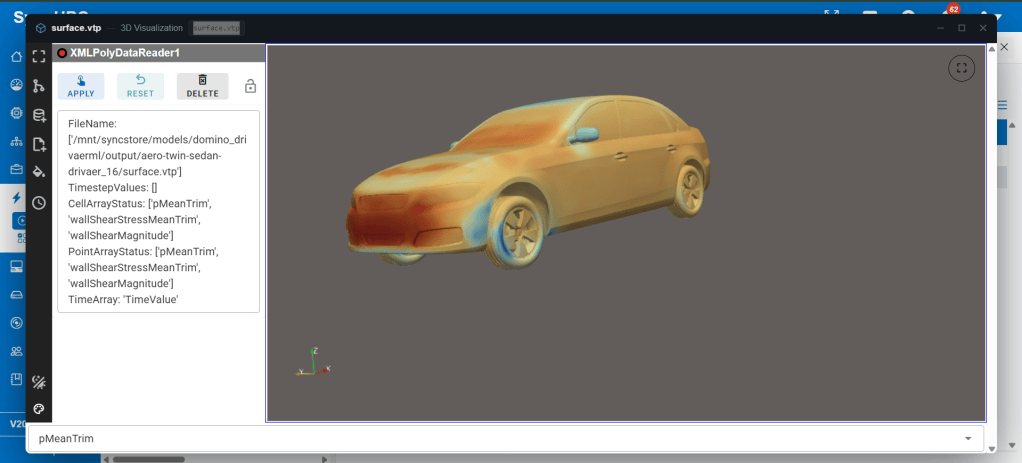
Open the surface file directly in SyncHPC’s integrated ParaView viewer to visualize predicted fields such as mean surface pressure and wall shear stress. Engineers can explore the 3D vehicle geometry, inspect pressure variations, and analyze results in the browser without downloading files or installing separate visualization software.
Where this fits in automotive engineering
Applications in Automotive Engineering
The same deployment and inference workflow can support a range of AI-assisted engineering applications, depending on the model and its intended use.
Aerodynamics and CFD Surrogates
Surrogate models can provide rapid estimates of aerodynamic quantities, such as surface pressure and wall shear stress, for new vehicle geometries. This can help engineers screen design variants and prioritize cases for more computationally intensive analysis. Full CFD simulations remain important for reference comparisons and final engineering validation.
Visual Inspection
Computer vision models, such as YOLOv8, can be deployed for image-based inspection tasks involving components, assemblies or finished vehicles, provided the model has been trained for the relevant task.
Custom Engineering Surrogates
Models trained on simulation or experimental data for applications such as crash analysis, thermal behavior or durability can be deployed through the same workflow when their runtime requirements and input/output interfaces are compatible with SyncHPC.
Teams can also use the Develop and Train workflows within AI Studio when model development or fine-tuning is required before deployment.
Why SyncHPC ?
- Unified model-to-inference workflow
- Manage model deployment, inference execution, output storage and visualization through a single platform interface.
- Integration with existing infrastructure
- Use private container images and shared storage on supported on-premises, cloud or hybrid infrastructure configurations.
- Configurable compute resources
- Specify CPU, memory, GPU and replica requirements according to the needs of each model and the available infrastructure.
- Accessible inference for engineering teams
- Use configurable inference profiles to provide a form-based interface for model execution, reducing the need for users to construct API requests manually.
- Deployment visibility and troubleshooting
- Review model versions, deployment status, stages and logs through the platform interface.
- Integration with external applications
- Use the configured scoring endpoint to integrate deployed models with compatible scripts and applications, subject to the endpoint’s authentication and request requirements.
Deploy Your Own Engineering Models with SyncHPC
Explore how SyncHPC can support your organization’s AI inference workflows for CAE and CFD applications.
Contact the SyncHPC team at info@syncious.com to discuss your model, deployment requirements and engineering use case.


Leave a Reply